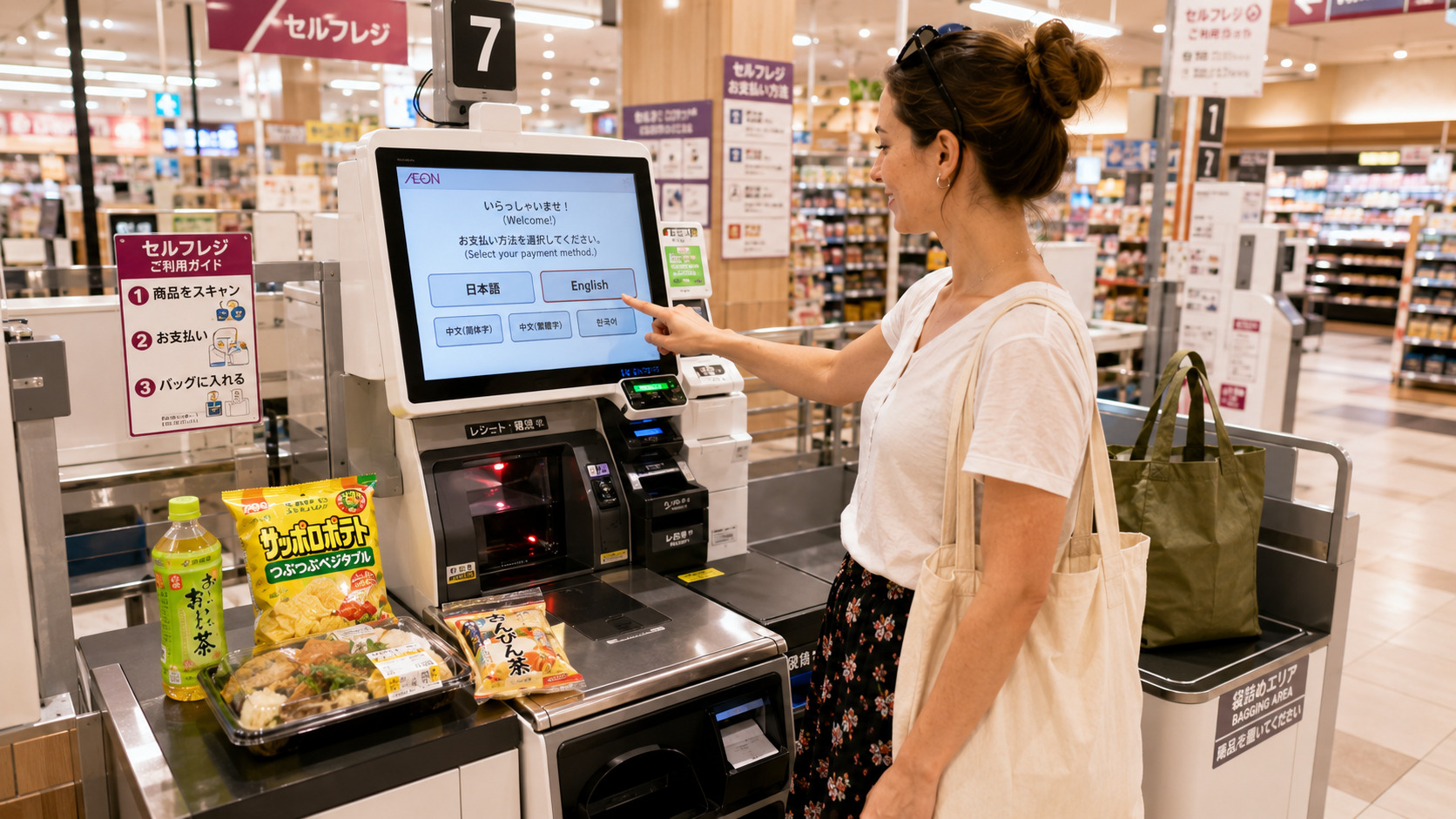
Simple guide for first-time visitors in Japan and Okinawa
- 1. Which Register Should You Use?
- 2. Two Types of Self-Checkout in Japan
- 3. Japan Does Not Use “Scan & Go”
- 4. Basic Flow of Full Self-Checkout
- 5. The Weight Sensor Trap
- 6. When to Pack Your Items
- 7. How to Choose a Shopping Bag
- 8. When You Cannot Find the Barcode
- 9. Payment Methods
- 10. Age Check for Alcohol and Tobacco
- 11. How Semi Self-Checkout Works
- 12. Common Problems for Travelers
- 13. Staff Will Help You
- 14. Useful Phrases
- 15. Your First Self-Checkout
- 16. Summary
1. Which Register Should You Use?
Use the correct register to avoid confusion. Japanese supermarkets have several types of registers.
- Cashier (staff scans and takes payment)
- Self Checkout / Self Register
- Assisted Checkout (staff scans, you pay at a machine)
Self-checkout is fast when you have only a few items. If you choose the wrong line, staff will guide you.
Quiet Tip: Some self-checkout lanes have limits like “10 items or fewer.” Check the sign at the entrance.
2. Two Types of Self-Checkout in Japan
Type 1: Full Self-Checkout
You scan each item and pay by yourself. Common in Aeon and 100-yen shops.
Type 2: Semi Self-Checkout (Assisted Checkout)
In Okinawa, many supermarkets use this system. Staff scans your items. Then they say, “Please pay at Number 1” or “Number 2.”
3. Japan Does Not Use “Scan & Go”
Some countries let you scan items with your phone and leave. Japan usually does not use this system.
English Tip: Most supermarkets in Japan do not use Scan & Go. Use the checkout machine unless the store clearly says so.
4. Basic Flow of Full Self-Checkout
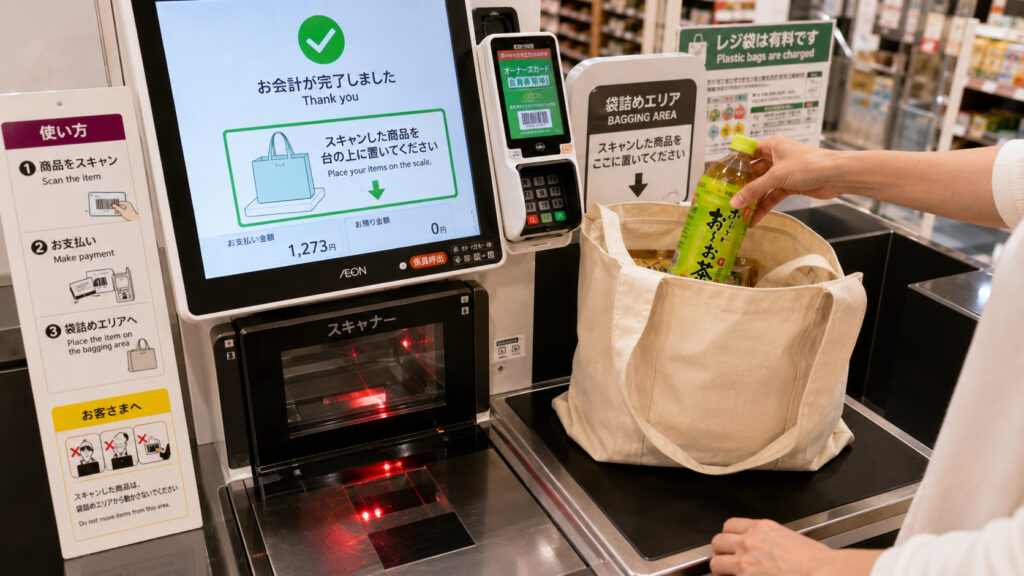
- Scan each item.
- Place it on the Bagging Area next to the scanner.
- Choose a shopping bag.
- Choose your payment method.
- Take your items and receipt.
The Bagging Area is the small platform where you put scanned items.
Important: Please keep all scanned items on the Bagging Area. Moving them causes errors.
5. The Weight Sensor Trap
English Tip: Many self-checkout machines use a weight sensor.
The machine checks the weight of scanned items. If the weight changes unexpectedly, it may stop and show an error.
Be careful:
- Set your eco-bag on the scale before scanning.
- Do not move items after scanning.
- Do not place your phone or wallet on the scale.
- Do not lift scanned items.
- Keep items on the scale until payment is finished.
6. When to Pack Your Items
In some countries, you pack while scanning. In Japan, this causes errors.
- After scanning, place the item on the Bagging Area.
- Pack your items after payment if needed.
7. How to Choose a Shopping Bag
The screen shows:
- No bag
- Small
- Medium
- Large
Take a bag from the hooks near the register. You do not scan the bag. The fee is added automatically.
8. When You Cannot Find the Barcode
Japanese products have barcodes in many places.
Turn the item slowly and check the back, side, or bottom.
9. Payment Methods
You can use many payment types:
- Cash
- Credit card
- IC cards (Suica / ICOCA)
- QR code (PayPay, etc.)
English Display
English Tip: Many newer machines have an English button. If not, staff can help you anytime.
Cash Tips
- Put coins into the round coin slot.
- Insert bills into the bill slot.
- Take your change from the lower tray.
- Do not forget your receipt before leaving.
Quiet Tip: Final “Confirm” Button
On some machines, you also need to press the “Pay” or “Confirm” button. Then your change and receipt will come out.
10. Age Check for Alcohol and Tobacco
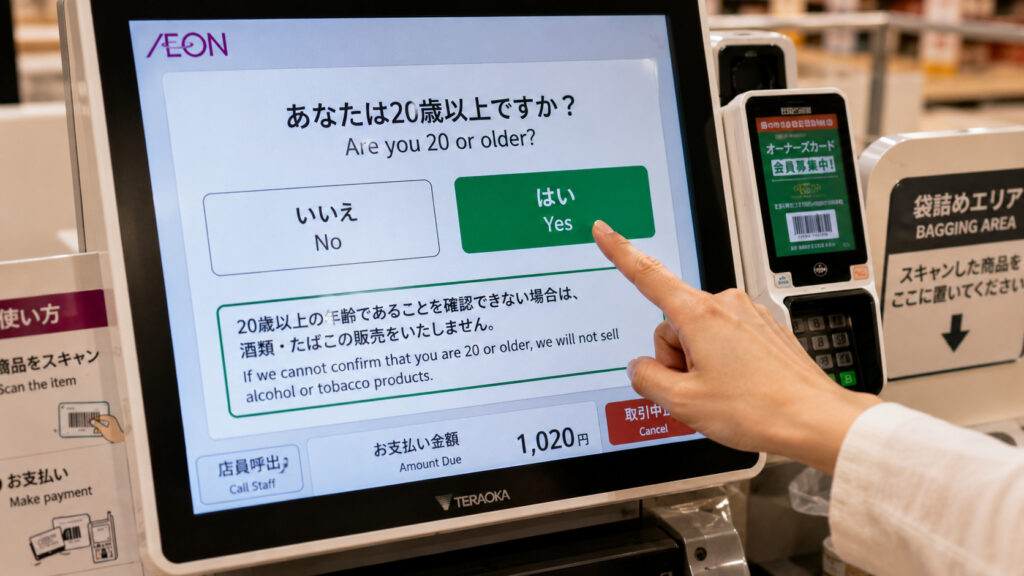
When buying alcohol, tobacco, or some energy drinks, the screen shows:
“Are you over 20?”
This is not an error.
Quiet Tip: Japanese Screen
If the machine is only in Japanese, you will see a big button with the number 20 and the Japanese word 「はい」 (Hai / Yes).
Press the 「はい」 button to continue. Most stores do not ask to see your passport, but some staff may check your age if needed.
11. How Semi Self-Checkout Works
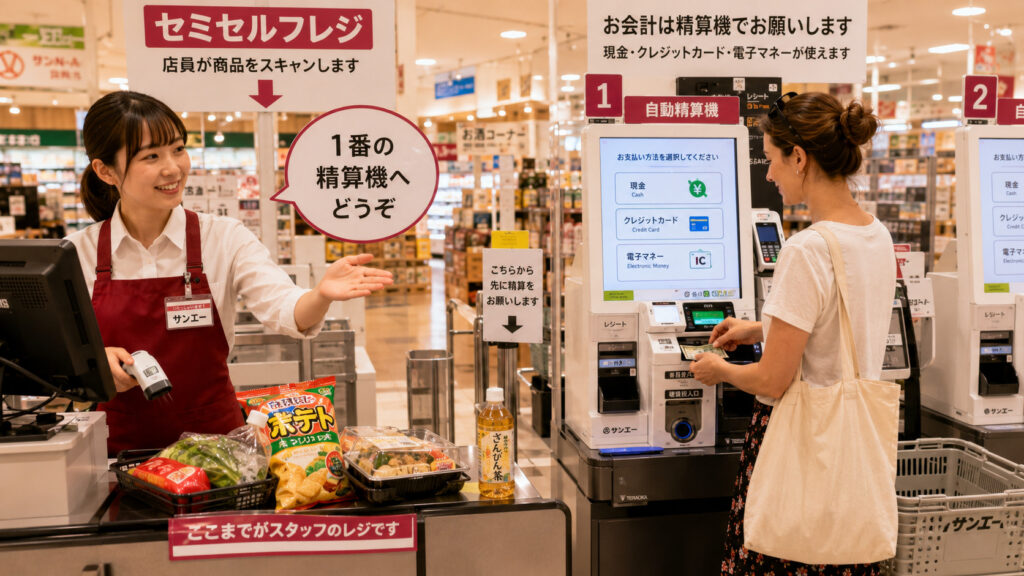
- Staff scans your items.
- They tell you your register number, like “Number 1.”
- Go to that machine, check the amount, and pay.
- Take your items and receipt.
12. Common Problems for Travelers
- Not knowing where the bags are
- Trying to scan the bag
- Forgetting to place items on the scale
- No English button
- Thinking age check is an error
- Forgetting change or receipt
13. Staff Will Help You
Japanese staff are kind and helpful. They usually notice quickly and are happy to help. If you need help, just raise your hand.
14. Useful Phrases
“No bag, please.” “One bag, please.” “Where is the bag?” “English, please.” “Can you help me?”
Speak slowly and you will be understood.
15. Your First Self-Checkout
English Tip: The first time feels slow. The second time takes only one minute. Most supermarkets use a similar system.
After your first time, it becomes much easier.
16. Summary
Key Points:
- Japan has two types of self-checkout.
- Weight sensors stop the machine if items move.
- Staff will help you anytime.
Full Summary:
- Check which register to use
- Japan does not use Scan & Go
- Many machines use weight sensors
- Choose your bag on the screen
- Do not scan the bag
- English mode may not exist
- Age check is normal
- Staff will help you
- After your first time, it becomes much easier
Related Guides
👉 Okinawa Travel Guide for First-Time Visitors
👉 Do You Need a Car in Okinawa? (A Local’s Honest Advice)
👉 How Much Time Do You Need in Okinawa?
👉 Why Your Last Day in Okinawa Feels Better With Extra Airport Time
コメント